We talk to small business owners about implementing or updating a CRM system just about every week. I recently had a conversation where “that would be nice to have, but we really don’t need it” came up a lot when reviewing some Zoho CRM features.
You’d never base your ultimate software decision on a “nice-to-have.” But, couldn’t there be a cumulative effect to having many little time-saving, innovative, and intelligent features? This got me thinking about how adding up a bunch of “simple little things” can rock your day.
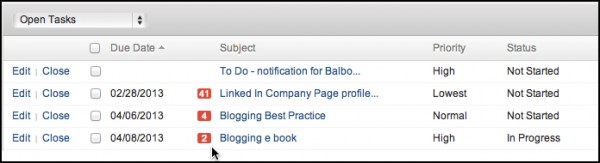
Take Zoho CRM’s Home page, for example. Log in and you’ll immediately know if there are overdue tasks, by how many days, as well as by the priority and status. Tasks are much less likely to get away from you when they stay front and center like this.
SaaS (software as a service), rolls out new features on a regular basis. Unless you’re subscribed to the publisher’s blog, they’re easy to overlook; Zoho (Leadmaster, and other SaaS publishers) include on-screen updates that inform users of new features as they become available.
 You can click on the “Learn More” link to get the scoop on what’s new, or close it out and move on. This push technology helps users stay current with new features as soon as they become available to take full advantage of the software subscription.
How about eliminating steps to complete tasks? You should expect SaaS CRM to include automated tasks (create a new lead via a web form, follow up with an email, schedule a call), yet there are times when you don’t want automation to take over your universe. What if you could take an action on a specific set of records, but in an automated-only-when-I-wanna’ sort of way? Zoho macros let each user create their own “short cuts” and apply them in an ad hoc manner. Creating them is super-easy.
Macros include email, field updates, and tasks, and you can choose all of some of those steps for each macro.

Name the macro and give it a description. The first step is picking an email template for a follow up email.
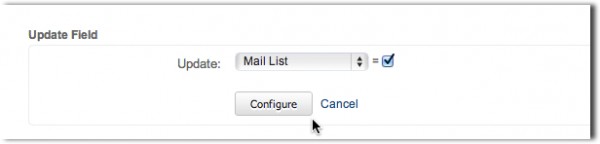
In our example, we want to add selected new contacts to our mailing list.

And then we’ll want to follow up in five days (and make sure we schedule a reminder for that to happen).
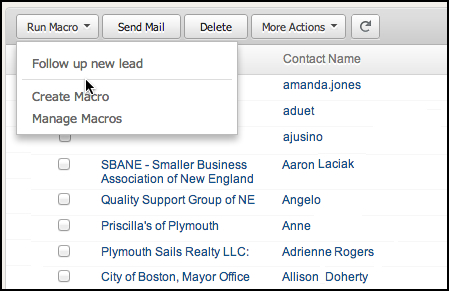
It’s easy to run the macro against a list of records and instantly update, email, and schedule with all of them, in just a couple of mouse clicks. Automation is a key benefit of CRM software that’s underutilized.
Then there’s the BCC Dropbox email feature that enables you to send emails from up to five different email accounts and still have them attach to a Contact or Lead.

Use the BCC Dropbox feature if you’re away from your office and need to use your Gmail account, and still capture the history of important email interactions.
Speaking of being away from the office – a question I get all the time is, “How can I find contacts that are near other accounts when I’m on the road?”
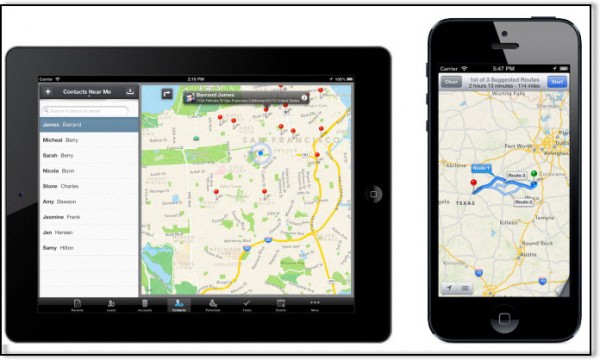
Zoho CRM has a “Find Nearby Customers” feature that works in smartphones and tablets. It uses your Zoho CRM records and the location services in your devices to map and list all of the contacts within a specified radius. This works on IOS, Android, and Blackberry.
This list just scratches the surface. Would you select software for just one of these features? Probably not. But when you start to look at the sum of the “nice-to-haves” they add up to be far more that the sum of just one or two small “non-critical” features.
If you’re working with a consultant, she’s learning about your business and business requirements and will have insights into the “nice-to-haves” that can have a big impact on your productivity. Imagine, maybe you could get home in time for dinner again!